Let contractors ship features without your core code
Hand a contractor the checkout module, not the recommender. They clone, build, test and push with plain git. Your team reviews a normal pull request.
acme/shopon GitHubalice's clone
Example contractor view: they can edit src/checkout/, read the rest of src/ and .github/, get core/recommender/ as types only, and have no access to core/fraud-model/, infra/ or .env files.
The situation today
You need outside help on one part of the product, but GitHub only gives repository-wide access. So you either split the repo (and break builds and history), copy code into a sandbox repo (and merge by hand), or give them everything and hope the contract holds.
With coding agents, "everything" now means a working copy of your product in an afternoon. The contract still matters, but it shouldn't be the only control.
A typical contractor setup
| Path | Access | Why |
|---|---|---|
src/checkout/ | Can edit | The module they're building |
src/ (everything else) | Can read | So they can follow conventions |
core/recommender/ | Types only | Imports compile, logic stays home |
core/fraud-model/ | No access | Not needed for the job |
infra/, .env* | No access | Never needed by a contractor |
.github/workflows/ | Can read | Read-only by default for everyone fenced |
How Gitfence handles it
Folder-level access
Choose No access, Types only, Can read or Can edit per folder or file, for the contractors group or one person.
NDA before the first clone
Invitation links can require your NDA or security policy. Until it's signed, git, MCP and CI all refuse. Each signature records the exact document hash, typed name, time and IP.
Their code still compiles
Types only replaces a Go, Python or TypeScript module with its API and no implementation, so imports resolve, the build works and the editor autocompletes.
Tests on the real code
Fenced CI runs your suite on the full repository in a sandbox with no network, and returns the verdict: passed or failed, counts and failing test names. Runs self-hosted; on hosted, we set it up with you.
Normal pull requests
Their pushes become GitHub PRs your team reviews as usual, with reviews and checks relayed back to them, hidden content redacted.
Per-person exceptions
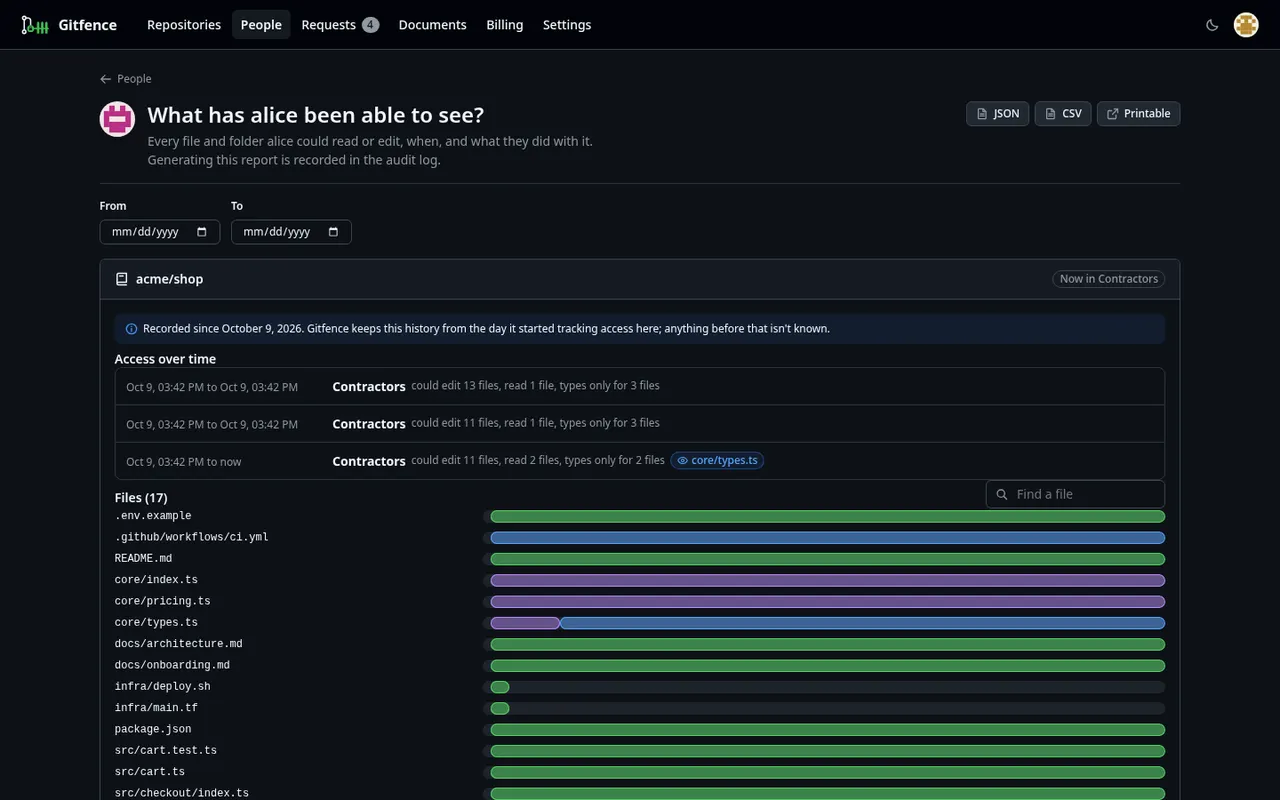
One senior contractor needs to read core/types.ts? Give it to that person only. The rest of the group is unchanged.
Temporary access
Grant a path for 2 hours, a day, a week or until a date. It ends on time, with no reminder to set.
Offboarding with an exposure report
When the engagement ends, see every path they could ever read or edit, and when. Export it as CSV or a printable page.
What it won't do
- Fencing works from now on. If a contractor already cloned the whole repo, that copy exists; rotate secrets and fence before the next engagement.
- Types only works for Go, Python and TypeScript. For other languages, use No access or Can read.
- GitHub only today.
Questions
Does the contractor need a GitHub account in our organization?
No. They sign in to Gitfence with their own GitHub account and get a Gitfence clone URL. They never get credentials to your GitHub repository or its fork.
How are agencies with several people handled?
Create a group for the agency, set its access once, and send one invitation link restricted to their email domain. Each person signs the documents individually and counts as one restricted person.
Can access end automatically when the contract does?
Yes. Invitations can set an access end date, after which git, MCP and CI stop working for that person, and individual grants can end after a set time or when a Linear or Jira ticket closes. Requests can be approved for a set time, from the web or with one tap in Slack.
Fence your first repository in minutes
Free for one repository and your own team. Add a restricted person and Pro is free for 14 days, no card.