What Gitfence guarantees, and what it doesn't
Gitfence controls what someone can see from the moment you fence it, not what they saw before. Everything below is either covered by our tests or written down as a limit. For signed releases, audits, the company and how to check us yourself, see the Trust Center.
The guarantees at a glance
An IP-leak check on every fenced PR
Each pull request that comes through the fence is scanned for copies of your hidden code.
Audit log, streamed to your SIEM
Signed webhooks, JSONL or CSV export, and a retention setting.
If Gitfence is down, your core team doesn't notice
They work on GitHub directly. Gitfence is never in their path.
Billing never locks out your team
A missed payment never touches your core team. Restricted people get 14 days' grace.
Risky pull requests wait for a person
Sign-in, payments, migrations, deploys, packages and secrets.
Secrets left out by default
Secrets files hidden, key values replaced, new secrets refused.
Agents get less than their owner
Narrower access, an end date, and folders no agent may have.
Signed exposure receipts
What was served to whom, checkable by anyone.
Encrypted at rest, with a key we don't keep
Your people's credentials hold the key. Locked after ten idle minutes.
Self-hosted, with your own keys
Your servers, HashiCorp Vault for the keys, no telemetry.
EU backups without code
Daily, in Helsinki. Accounts, settings and audit logs; never source.
A public status page
Checked every minute from three locations.
Enforced and tested
- Hidden code is never sent, in any clone.
- Every push is checked, path by path.
- Tests run on the real code with no network.
Not covered, said plainly
- Code someone already saw can't be recalled.
- Encoded test output slips past redaction.
- No SOC 2 or independent audit yet. Both are on our roadmap.
Encryption at rest
Your code is encrypted at rest with a key we don't keep. The key is held by your people's and agents' Gitfence credentials and your recovery key; our database stores only locked copies of it. Your code is readable only in our server's memory while one of your people or agents is using Gitfence, and for up to ten minutes after. We do not back up your code.
- Each organization has one master key, stored only wrapped (AES-256-GCM) once per credential. The server keeps hashes of those credentials, not the credentials.
- Mirrors, views, generated types, pull request snapshots and test work trees live in a folder the Linux kernel encrypts (fscrypt: AES-256-XTS for contents, AES-256-CTS for names). Locked, nobody on the server can read them, root included.
- Revoking a token or removing a person destroys that credential's copy of the key. A customer who leaves has their keys and encrypted files deleted.
Limits. File names in your rules and audit log are metadata and are readable. While your code is in use, a compromise of our running server could expose it. Gitfence reads your repositories through the GitHub App you installed, so our service can fetch your code from GitHub for as long as it is installed. This is not zero-knowledge. For that, self-host. How the recovery key works.
Self-hosted, with your own keys
Enterprise can run on your own servers: one container image installed with docker compose, against github.com or your GitHub Enterprise Server.
- No telemetry. It never calls us: no license server, no usage or error reporting. The license is a signed file checked offline.
- Your GitHub App. Created in your organization; its private key never leaves your server.
- Customer-managed key. With HashiCorp Vault (transit), every stored copy of the master key is sealed again with a key only your Vault opens. Disable it in Vault and all code locks within five minutes.
- Your backups and alerts, to your own S3-compatible bucket and your own team.
Self-hosted Gitfence · install guide
Backups
Daily, to object storage in Helsinki (EU), in a storage project that holds nothing else. The database (accounts, settings, rules, audit logs, signature records) is kept for 14 days, signed documents for 30. No source code is ever backed up: after a restore, mirrors are fetched from GitHub again and restricted people clone again. We have run a restore drill. The audit log keeps the start of comments that agents post, which can quote code.
An IP-leak check on every fenced PR
Every pull request delivered through Gitfence gets a check called Gitfence on GitHub. It compares the lines the PR adds with fingerprints of the code that person can't see, including older versions of it.
- Fails when added lines match hidden code. The matched source is never shown in the check.
- Asks for review when GitHub left out part of the diff or a file is binary.
- Fails when the branch was changed outside Gitfence after delivery.
- Names the person and the agent that delivered the change.
It catches verbatim and near-verbatim copies. Rewritten or encoded code gets past it, so treat it as a deterrent, not a proof. Pull requests your core team opens directly on GitHub don't go through Gitfence and aren't scanned.
SIEM streaming and audit retention
- Streaming: any webhook can also receive the audit stream. Deliveries are HMAC-signed and retried. Streaming starts from the moment you turn it on; older events aren't replayed.
- Export: one ordered JSONL or CSV file across git traffic, pushes, MCP calls, test runs, settings and access changes.
- Retention: set how many days to keep. Older rows are deleted, and the deletion itself is logged. Signature evidence and the history of access rules are always kept.
If Gitfence is down
Your core team clones, pushes and merges on GitHub, with your CI and branch rules. None of that goes through Gitfence, so an outage doesn't touch it.
What pauses until we're back: fenced clones, fetches and pushes, the agent tools, Fenced CI, and the Gitfence check on new fenced pull requests. Pull requests already on GitHub stay there.
Live status: status.gitfence.dev, checked every minute from three locations (the service, the website and git).
If billing lapses
Your core team's access never depends on your subscription. After a failed payment or a cancellation nothing changes for 14 days. After that you can't add restricted people or repositories, and the restricted people you have are paused until you renew; their access comes back exactly as it was. Full-access teammates keep working throughout. Removing people always works.
Risk-based review
Every pull request that comes through Gitfence gets a check called Gitfence review, a label and a plain-language summary.
- Needs a human when it touches sign-in and security, payments and billing, database migrations, CI, deploy and infrastructure, dependencies, permissions, or secrets. You can turn areas off and add your own.
- Low risk otherwise. That check passes on its own.
- A Needs a human check passes when a person approves that exact version on GitHub. Bots and the author don't count.
- The summary lists what changed, new dependencies with versions, the Fenced CI result and which agent made it.
- Make the check required in your branch rules and risky changes can't merge unreviewed. Pull requests opened straight on GitHub pass it untouched.
Limits. It is decided from file paths and dependency files, with no AI involved. Risky logic in an ordinary-looking file is marked Low risk. Dependency files it can't parse are named so you read them yourself. The label and reviewer requests need permissions your installation may not have; the check always posts.
Secrets
- Secrets files are left out of every restricted copy:
.env*,*.pem,*.key, SSH keys,*.tfvars,*.tfstate, cloud credential files and similar. Only a rule naming the exact file lifts that..env.examplestays. - Key values inside other files are replaced with a stand-in: known formats (AWS, GitHub, Stripe, Slack, npm, PyPI, private keys and more) and random-looking credentials.
- Pushes that add a new secret are refused, for restricted people and for every AI agent.
Limits. Something that only looks like a hard-coded password is reported to admins but served as it is. Binary files aren't scanned. A line marked gitfence:allow by someone with full access is left alone. A teammate with full access gets real values, and so does their agent unless you limit it.
Agents fenced below their owner
- An agent's own access can only narrow what its owner has, per folder or per repository.
- Agent sign-ins end after 30 days by default, or when their pull request merges or closes, or their ticket closes.
- A folder marked No AI agents is withheld from every agent, even a full-access teammate's.
- Every agent commit on GitHub ends with
Gitfence-Agent: name (of @owner). One typed by hand is removed.
Limit. This covers agents that sign in to Gitfence as agents. If someone points an agent at their own personal clone, Gitfence sees a person.
Signed exposure receipts
A receipt lists what Gitfence served to one person or agent, rebuilt from every clone and fetch it recorded. A repository attestation lists who was served which folders and which files were never served to any AI agent.
- Signed with an Ed25519 key that belongs to your organization. Old public keys are kept, so earlier receipts still verify.
- JSON, and a PDF that carries the same JSON. Anyone can check either at the verify page, with no account.
- Share links show one stored receipt and can be withdrawn.
Limits. It is an upper bound of what they could have received, not a prompt log. Clones made before recording began are counted but their files aren't listed. Review comments, issues and test output aren't included, and neither is anything taken from GitHub directly.
For the evidence behind Gitfence itself, read the signed release ledger and the Trust Center.
Leak tracing
Each person's copy, and each limited agent's, carries a unique harmless marker. It is on by default and removed from everything they push.
- It sits only in text Gitfence generates: the agent guide, the first line of generated types, and the stand-ins for secrets.
- Paste leaked text into Gitfence and it names the person, the agent and when that copy was served.
Limits. Ordinary source files carry no marker, so a paste of plain code can't be traced. Someone who knows about the marker can delete it.
One-paste setup
The prompt you paste holds a link that works once and expires after 15 minutes, never a long-lived password. An admin's setup sign-in lasts one day, and nothing about access changes until you approve a preview.
The boundary: hidden objects are never served
Gitfence keeps a private mirror of your GitHub repository that is never served to anyone. For each set of permissions it builds a filtered copy of every commit: hidden paths are removed, types-only paths are replaced by generated declarations, and commits that changed only hidden files are dropped.
The repository a restricted person clones is filled only by fetching those filtered commits. Hidden files aren't masked at download time; they were never copied into that repository at all. That's why shallow clones, partial clones, mirrors and requests for specific object IDs come back clean.
When permissions change
History is forward-only. A change adds a commit called Gitfence: access updated that adds or removes files, so git pull fast-forwards and nothing is force-pushed. Revoking access removes files from now on; it can't remove them from an earlier clone.
Every push is checked
Before anything reaches GitHub, each commit in a push is compared with its parent and every changed path is validated against the person's view. Gitfence rejects:
- Creating or changing hidden, types-only or read-only paths, including in an intermediate commit that a later commit reverts
- Case, full-width and Cyrillic look-alikes of fenced paths
- Windows-style spellings (
core\x.ts,core./x.ts, trailing spaces, device names) - Symlinks into fenced folders or to absolute paths, gitlinks, and mode changes on read-only files
- CI workflows,
.gitattributes,.gitmodulesand.gitfence.yml, which are read-only by default - Pushes to the default branch, tags, notes and internal refs
Multi-branch pushes are atomic: either all refs are accepted or none.
Threats and how they're handled
| Threat | Defense | Status |
|---|---|---|
| Reading hidden code through git | Hidden objects never exist in the served repository. Protocol v0 and v2, --depth 1, --filter=blob:none, --filter=tree:0 and --mirror tested, including a visible file nearly identical to a hidden one (delta compression). | Tested |
| Fetching hidden objects by ID | Not present in the view; arbitrary-SHA and filter-based wants are disabled on the server. | Tested |
| Writing into or around a fence | Per-commit push validation (see above). | Tested |
| A test that reads hidden code and uploads it | Fenced CI runs in a bubblewrap sandbox with no network (neither internet nor the Gitfence host); the host's home directory, mirror and data are invisible; writes don't reach the host. | Tested |
| A test that prints hidden code | Output redaction catches verbatim, re-indented and one-token-per-line printing. Summary mode returns only pass/fail and the exit code. | Tested |
| Encoded output (base64, hex, reversed) | Not recognised by redaction. Use summary mode for untrusted people; runs are audited and rate-limited. | Limit |
| Values leaking through Types only | Literal values are widened in generated TypeScript declarations: constants, as const objects, tuples, static readonly fields, namespaces. Go and Python stubs replace every literal and every body, and drop comments, tests and decorator arguments. Other files under a types-only path never appear. | Tested |
| Commit messages revealing hidden work | Commits touching only hidden files disappear with their messages. Commits touching both keep their message verbatim. | Limit |
| Side channels (exit codes, timing) | A few bits per run can leak. Rate limits and auditing bound it. | Limit |
| Hidden code copied into a visible file (IP leak) | The Gitfence check scans every fenced pull request against fingerprints of hidden code, including historical versions. It's a deterrent against verbatim and near-verbatim copies, not a proof. | Tested |
| Stolen or over-powered tokens | Tokens can expire and be revoked per agent. Agent tokens never get admin access, even an admin's own. Missing, malformed, oversized and expired tokens are refused on git, MCP and the admin API. | Tested |
| Probing for private repositories | Non-members get byte-identical responses for existing and missing repositories, on git and MCP. | Tested |
| Code before the NDA | Unsigned required documents, pending approval or an expired access date block git, MCP tools and Fenced CI, not just the web page. | Tested |
| Something someone already saw | Nothing can revoke it. Fence before you invite. | Limit |
| Access that outlives its purpose | Temporary grants end at their exact time, checked on every git, MCP and CI access, not by a late sweeper. Grants tied to a Linear or Jira ticket end when the ticket is done; reopening it doesn't restore access. | Tested |
| "What could this person or agent ever see?" | Exposure reports replay every rule, membership and exception change over the file history, per person or per path. History before the feature was installed is unknown, and only the default branch is considered. It is an upper bound of what was served, not a log of prompts. | Tested |
| Agent code merging unreviewed | Risk-based review marks pull requests that touch risky areas Needs a human; the check can be required. Decided from paths, not logic. | Tested |
| Secrets reaching a contractor or agent | Secrets files hidden and recognised values replaced in every restricted copy; pushes adding secrets refused. | Tested |
| Password-like values that aren't a known key format | Reported to admins, served as they are. | Limit |
| An agent with more reach than its task needs | Agent scopes only narrow, end on time or on merge, and respect No AI agents folders. | Tested |
| A Gitfence outage | The core team works on GitHub directly and is unaffected. Fenced clones, pushes, agent tools and Fenced CI pause until service returns. | Limit |
| A lapsed subscription locking people out | Your core team's access never depends on billing. Restricted people keep theirs through a 14-day grace period, then are paused until you renew; it comes back exactly as it was. | Tested |
| Evidence for audits | Audit export (JSONL or CSV) of git traffic, pushes, MCP calls, test runs, settings and access changes, with a retention setting that always keeps signature evidence and rule history. Webhooks can stream it to a SIEM. | Tested |
GitHub Actions and forks
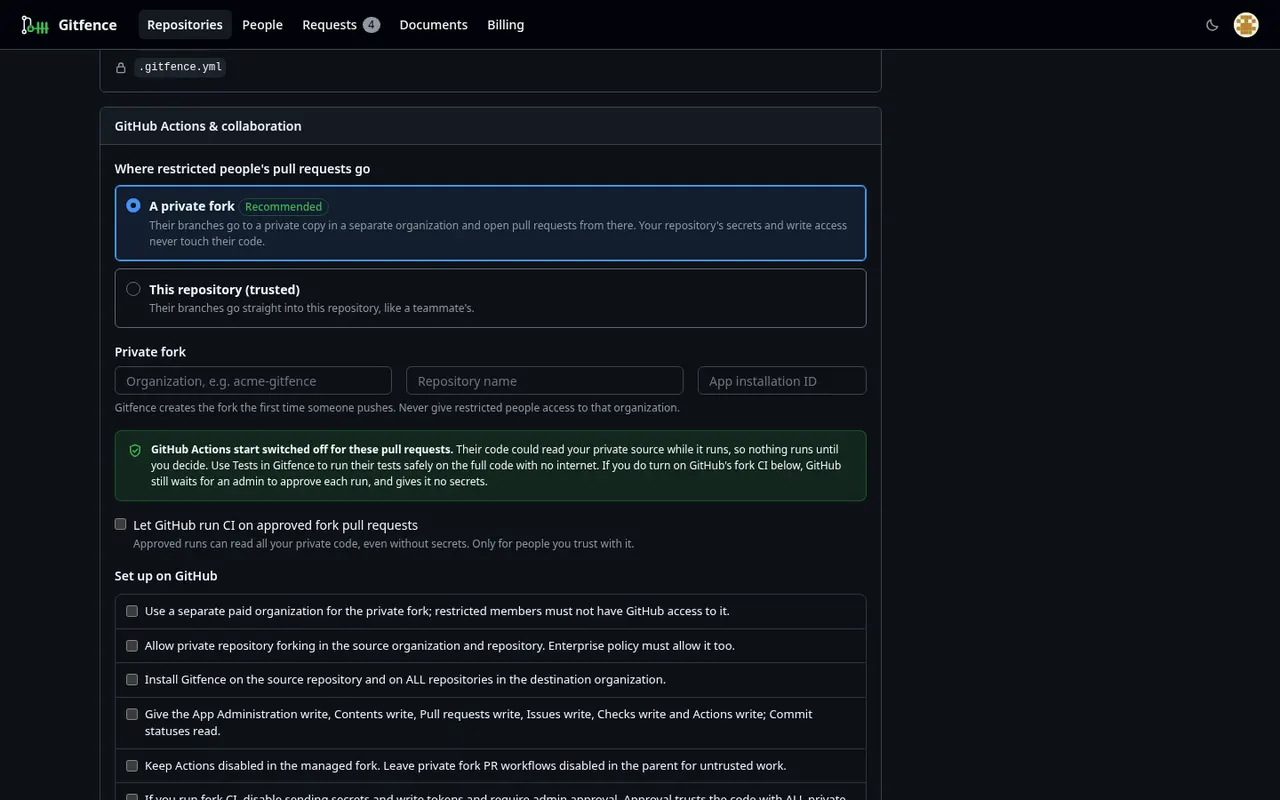
By default, restricted people's branches go to a private fork in a separate organization, with GitHub Actions switched off there. The fork protects your secrets and write tokens. It does not protect hidden source: any workflow that runs proposed code against the full tree can read and send it out, even with a read-only token. That's why fork CI starts disabled, and why we recommend Fenced CI for untrusted work.
If you choose to let GitHub run CI on approved fork pull requests, Gitfence still requires no secrets, no write tokens and admin approval in GitHub's fork-workflow policy. Review pull_request_target, workflow_run and comment-triggered workflows either way.
Accounts and credentials
- Sign in with GitHub uses PKCE (S256) and a single-use state. GitHub access tokens are only used to read identity at sign-in and are never stored.
- Session IDs are random 32-byte values stored only as SHA-256 hashes. Cookie-authenticated changes require a same-origin request.
- Invitation links are 32 random bytes, stored only as hashes, and shown once.
- GitHub App installation tokens are short-lived and kept in memory; git errors redact tokens.
- Restricted people never receive GitHub credentials or raw check logs.
Bugs our tests found, and the fixes
We publish these because a security page that has never found anything isn't believable.
- High: paths like
core./x.tsandcore\x.tswere treated as outsidecore/, but on Windows they are inside it. Fixed by canonicalising paths and rejecting non-portable names. - High: Types only leaked values for
as constobjects, tuples, static readonly fields, namespaced constants and numbers like.7311. Fixed in value redaction. - Medium: multi-branch pushes weren't atomic. Fixed: validate everything, then one atomic push.
- Low:
src/../core/x.tswasn't normalised by the policy (git refuses such paths, so it wasn't reachable). Fixed anyway.
What we haven't done yet
- No SOC 2 report or other certification. SOC 2 and an independent audit are on our roadmap. We won't imply otherwise. Our written security policies and a security overview are available on request.
- No independent penetration test yet; it is on our roadmap. The tests above are our own, run against real git clients, the HTTP server, MCP, the admin API and the CI sandbox.
- Slack, Linear and Jira integrations are tested offline against stand-in servers that follow their documented APIs. They haven't been run against the live services yet.
- Resource exhaustion beyond the existing output cap and time limits isn't covered by tests yet.
- Multi-tenant hosting isolation is verified in production deployment work, not in this test suite. If you need your own infrastructure, Enterprise can be self-hosted.
- Fenced CI is not switched on for everyone on our hosted service: there we set it up with you. Self-hosted, it runs today.
Reporting a vulnerability
Email [email protected] with the details (also listed in security.txt). Please don't test against other customers' data. We'll acknowledge your report and keep you updated until it's fixed.
Want the long version? The How it works page explains the projection engine and push path step by step.
Try it on a repository you care about
Fence a folder, preview it as someone else, then try to get it back out with git. We'd like to hear if you can.